
- Published on
Circuit Breaker: The Insurance of Distributed Systems
- Author

- Name
- Abidin Özdurmaz
- @abidino
Table of Contents
- How Do Distributed Systems Communicate?
- Possible Problems in Distributed Systems
- Resilience Patterns
- What is a Circuit Breaker?
- The Cost of Not Having a Circuit Breaker
- Configuration & Strategy
- Real-World Considerations
- Implementation with Hexagonal Architecture
1. How Do Distributed Systems Communicate?

In its simplest form, a distributed system is a collection of independent computers that work together and look like a single system to the user. Modern applications rarely run alone. A typical service talks to multiple microservices, third-party APIs, databases, and cloud services.
But how did we get here? Let's first look at the traditional world (Monolith) and then the modern one (Microservices).
Traditional Architecture: Monolith

In a Monolith, everything is under one roof, like a government building where all departments operate in the same place.
- Direct Access: Services talk via simple method calls. No "lost packets" worry.
- Local Speed: Communication happens in microseconds; latency is almost zero.
- Tight Coupling: All modules depend on one process. If one part fails, everything usually fails.
Modern Architecture: Microservices

Now, we have a giant campus where every department is in a different building.
- Distributed Communication: Services talk over the network (HTTP, gRPC, MQ).
- Loose Coupling: You can update one service without breaking others.
- Independent Scalability: You only scale the services that need more power, saving money.
So, What Really Changed?
Here is the key point: In the monolith world, when Service A needed something from Service B, it was just a method call. Simple, fast, and reliable. The call either worked or threw an exception — and it happened in nanoseconds.
For developers, this shift changes the failure model completely. In a monolith, most failures are programming errors. In distributed systems, failures are often environmental: network latency, partial outages, overloaded dependencies, or temporary infrastructure issues.
But in the microservices world, that same "method call" turned into an HTTP request flying over the network. And the network is a completely different beast. It can be slow, it can drop packets, it can timeout, or the other service might just be down.
Think about it this way: In a monolith, you never had to worry about "What if calling the payment module takes forever?" — because it was running in the same process. But now, with microservices, every single interaction between services is a network call, and every network call is a chance for failure.
This is the trade-off. Microservices give us loose coupling, independent deployments, and scalability. But in return, we now live in a world where failure is not an exception — it's a guarantee. It's just a matter of when, not if.
So the real question becomes: How do we build systems that survive these failures instead of crashing because of them?
2. Possible Problems in Distributed Systems
Now that we understand the shift from method calls to network calls, let's talk about what can actually go wrong.
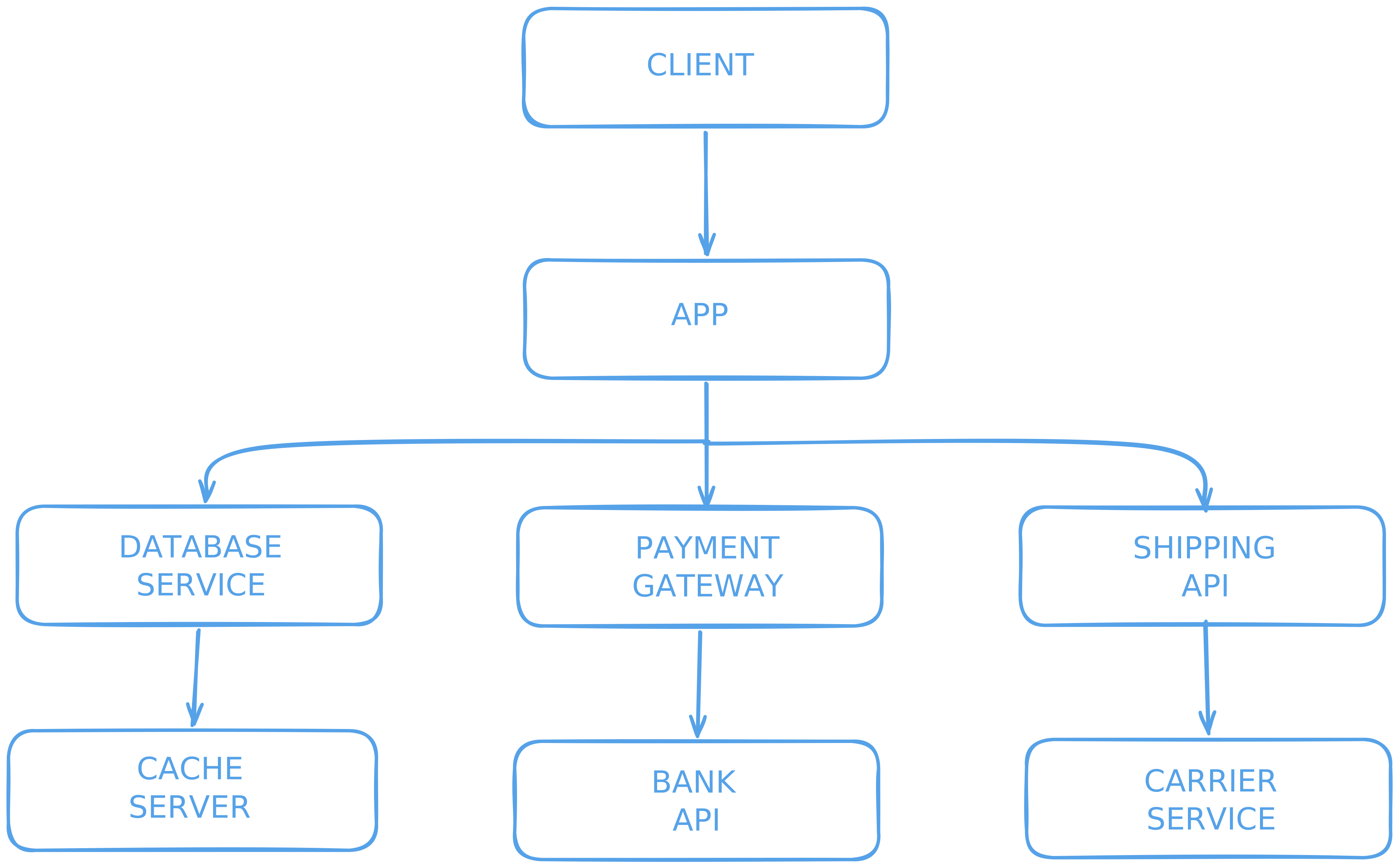
In a modern architecture, everything is connected like a chain. Your app talks to databases, cache servers, payment gateways, and shipping APIs. As we said before:
A chain is only as strong as its weakest link!
The Golden Rule of Networking
"Anything that relies on the network will eventually fail — the only unknown is when."
This isn't pessimism — it's reality. In a monolith, if the payment module is slow, you see it directly in your profiler. In a distributed system, a slow payment service can silently kill your order service, your notification service, and your entire user experience — all at once.
In distributed systems, we face several common problems:
- 🔴 Service Crash: Application errors, memory leaks, or OOM.
- 🐌 Slowdown: High load, GC pauses, or disk I/O bottlenecks.
- 🔌 Network Issues: Packet loss, DNS failure, or firewall issues.
- ⏱️ Timeout: Connections closing before getting a response.
- 🌊 Cascading Failure (Domino Effect): One service's error affecting everyone else.
Chain Reaction: The A → B → C Scenario
This is where many distributed systems fail in production. The problem is rarely a single error. The real issue is resource exhaustion caused by waiting.

This is one of the most important things to understand about distributed systems: a simple "slowdown" in one service can be more dangerous than a complete "crash."
Why? Because when a service crashes, you get an error immediately and you can handle it. But when a service is slow, your threads sit there waiting... and waiting... and waiting. They hold onto memory, connections, and CPU — doing absolutely nothing useful.
Let's look at how one slow service can kill the entire system:
Scenario: Service A calls Service B, and Service B calls Service C.
- T+0: Service C starts giving a 30-second timeout.
- T+1: Service B’s threads start waiting for Service C.
- T+2: Service B’s thread pool becomes completely full of waiting requests.
- T+3: Service B can no longer answer Service A.
- T+4: Service A’s threads start waiting for Service B.
- T+5: Service A crashes too!

The Result: A failure in one single service destroyed the TOTAL SYSTEM.
Notice something important here: Service C never "attacked" anyone. It just got slow. That's it. A simple slowdown in one service created a chain reaction that brought down the entire system in minutes. The services that crashed (A and B) were perfectly healthy — they just didn't know when to stop waiting.
This is why we say: "A slow service is worse than a dead service." A dead service gives you an immediate error. A slow service silently eats your resources until everything collapses.
To prevent this disaster, we need solutions. We call these solutions Resilience Patterns. They help us:
- ⏱️ Stop waiting for the full timeout duration for every failed request.
- 🧵 Save our threads and system resources.
- 🔥 Stop the fire from spreading to other services.
3. Resilience Patterns

These are design strategies used to protect the system when a service fails. Think of them as the safety equipment of your distributed system — each one protects you from a different type of danger.
- Timeout: "I won't wait forever." Stops waiting after a certain time to save resources. Without a timeout, a hanging connection can block a thread indefinitely. With a timeout of, say, 3 seconds, you at least free the thread and move on.
- Bulkhead: "If one room floods, the other rooms stay dry." Just like a ship is divided into watertight compartments, Bulkhead isolates different parts of your system. If the payment integration uses 20 threads and all of them get stuck, the order processing still has its own 20 threads and keeps working.
- Retry: "Let me try one more time." Some failures are temporary — a brief network glitch, a momentary CPU spike. Retry attempts the request again after a delay. But without limits or exponential backoff, retries can easily create a retry storm.
- Rate Limiting: "Slow down, you're sending too many requests." Limits the number of requests in a certain time window. This protects both your system and the downstream service from being overwhelmed.
Each of these patterns solves a specific problem. But none of them answers this fundamental question: "The service failed 50 times in the last minute. Should I even bother trying again?"
That's where the Circuit Breaker comes in — our main topic for today. While the patterns above handle individual requests, the Circuit Breaker takes a step back and looks at the big picture. It tracks the overall health of a service and makes a system-level decision: "Should we even try to call this service right now?"
4. What is a Circuit Breaker?

The ultimate "insurance" for your system.
Before we dive into the technical details, let me ask you a question: Have you ever seen a fuse box in your home? That small panel with switches on the wall? That's actually a circuit breaker — and it works exactly like the software pattern we're about to discuss.
The Home Electricity Analogy
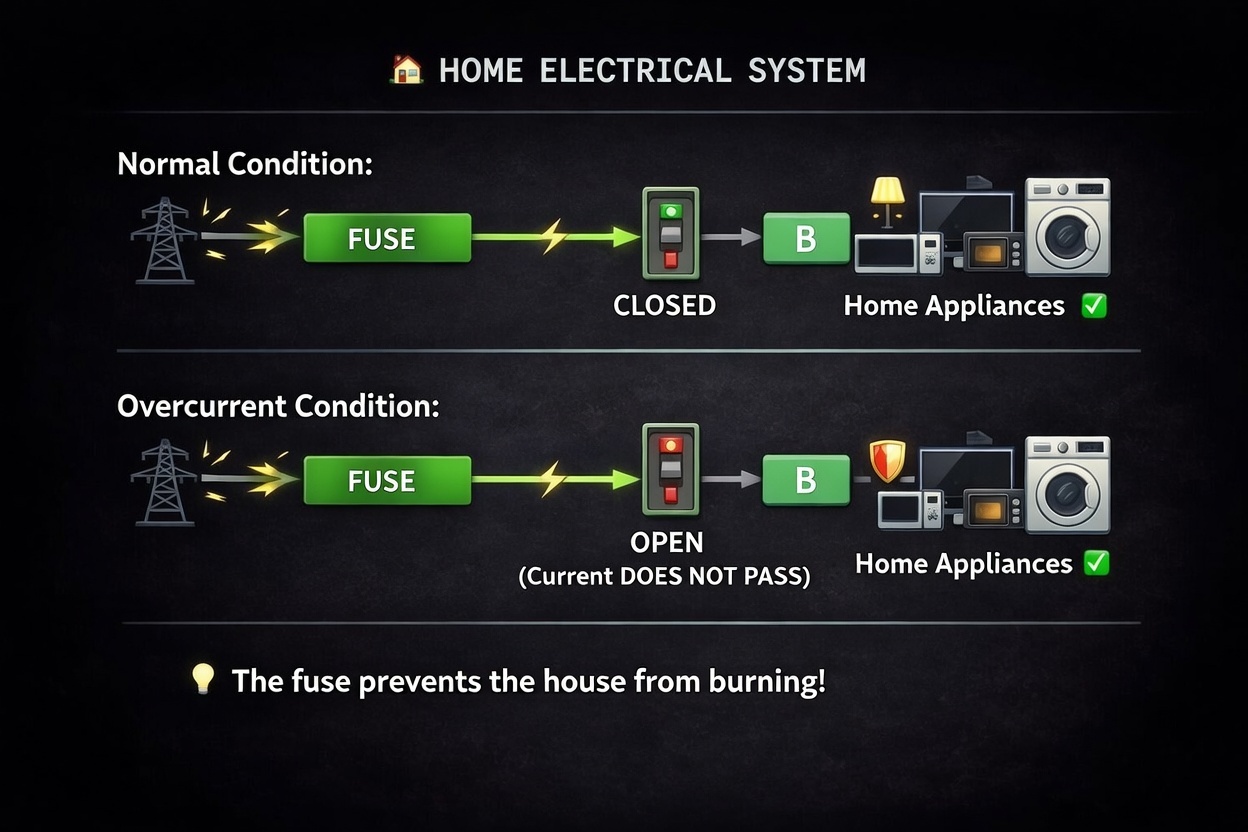
- Normal Condition (CLOSED): In a normal situation, your fuse is in the "Closed" state. Electricity flows through the fuse without any problems, and your home appliances (fridge, TV, etc.) work perfectly.
- The Problem (Power Surge): If there is a problem, like a massive power surge or a short circuit, the fuse detects that the high current will damage your appliances.
- Protection (OPEN): The fuse "trips" and moves to the "Open" state. It cuts the electricity immediately. Even though you lose power, your expensive devices are protected from burning out.
Software Circuit Breaker Logic
How It Works in Practice
1. The "Don't Wait" Policy In software, the biggest enemy isn't always an "Error"; it's "Slowness." We talked about this in the A → B → C scenario. When a service you depend on becomes slow, your application starts waiting. While waiting, it consumes memory and energy (resources). Your threads are blocked, your connection pool fills up, and your entire application starts to choke.
The Circuit Breaker says: "Stop waiting for a dead end. If it didn't answer the last 10 times, it won't answer now. Let's just tell the user 'System Busy' immediately and save our own strength."
Instead of waiting for the full timeout duration, the Circuit Breaker rejects the request in 0 milliseconds. That's the difference between a system that drowns slowly and a system that stays alive.
In high-traffic systems, even a few seconds of unnecessary waiting can consume hundreds of threads. This is why fail-fast strategies are critical for protecting system capacity.
2. Giving the "Broken" Service Room to Breathe Imagine a Database is struggling under a heavy load. If you keep sending thousands of requests every second, it will never recover — it will eventually crash completely. It's like a person who is already exhausted, and you keep giving them more and more work. They can't even catch their breath.
The Circuit Breaker acts like a shield. By "opening" the circuit, it stops the traffic, giving the struggling service a few minutes of silence to restart or clear its queue. It's not just protecting your app; it's helping the other service recover. Once the service gets back on its feet, the Circuit Breaker slowly lets traffic through again.
3. Automatic Health Checks (Self-Healing) This is the most "software-specific" and smartest part. Unlike a home fuse box where a human engineer has to manually flip the switch back on, the software Circuit Breaker is autonomous.
- It counts the failures.
- It decides when to stop.
- It periodically sends a "test request" (the Half-Open state) to see if the neighbor is feeling better.
- If the test passes, it automatically resumes normal operation.
In short: It transforms a "complete system crash" into a "temporary, managed silence." Your system doesn't die — it gracefully says "I'm having issues, please try again later" and protects itself in the process.
The Three States
To manage this logic, the system monitors traffic and moves between three distinct states:
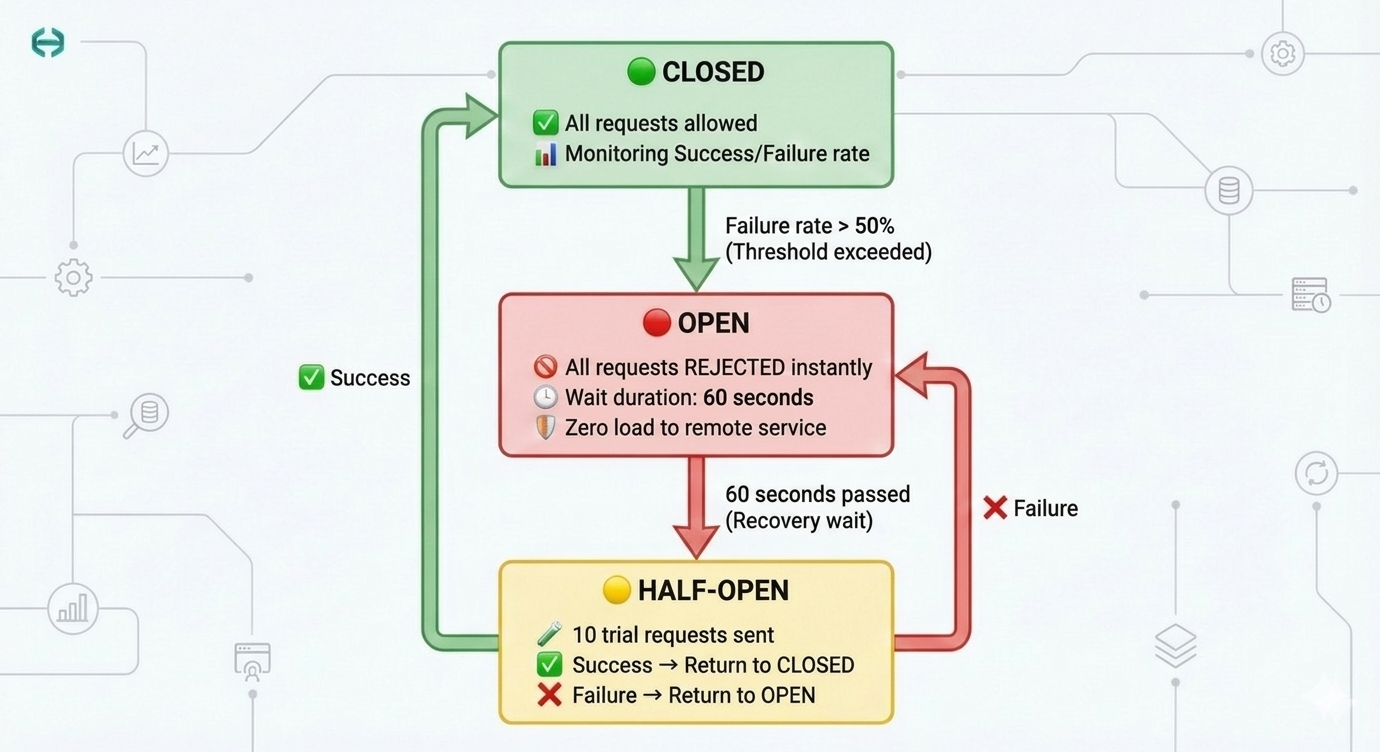
- CLOSED (Green): Everything is normal. Requests flow freely, and the system continuously tracks the success/failure rate in a sliding window. Think of it as a security guard who is standing at the door, letting everyone through, but quietly counting how many people are causing trouble.
- OPEN (Red): The failure threshold is reached (e.g., 50% failure). The circuit "trips." Requests are rejected instantly (0ms) — no waiting, no timeout, no resource waste. This is the "Fail-Fast" strategy. The guard has locked the door. Nobody gets in. Your app gets an immediate error response, and it can show a fallback message or use cached data instead.
- HALF-OPEN (Yellow): After a "wait duration" (e.g., 60 seconds), the system cautiously opens the door — just a crack. It allows a small number of test requests through. If they succeed, it means the service has recovered, and the state goes back to Closed. If they fail, the door slams shut again (Open) for another cool-down period.
But rejecting requests immediately raises another important question: what should the system return instead?
Fallback Strategies
When a Circuit Breaker is OPEN, the system stops calling the external dependency. But the application still needs to respond to the user somehow. This is where fallback strategies come into play.
A fallback defines what the system should do when the protected service is unavailable.
Common fallback strategies include:
1. Cached Response
If the requested data is not extremely sensitive to freshness, returning cached data is often the best user experience.
Example:
- Product catalog
- Exchange rates
- Feature flags
Instead of failing the request, the system returns the last known valid result.
2. Graceful Degradation
Sometimes it is better to return a reduced version of the functionality instead of failing completely.
Examples:
- Showing products but temporarily disabling checkout
- Allowing browsing while hiding recommendations
- Displaying limited information when a provider is unavailable
The system keeps working, but with reduced capabilities.
3. Default Response
For some operations, the safest fallback is returning a predefined response.
Examples:
- Returning
"service temporarily unavailable" - Returning an empty recommendation list
- Skipping a non-critical integration
This ensures the system stays responsive even when dependencies fail.
A key design principle is this:
Not every dependency deserves to break the user experience.
Circuit breakers combined with well-designed fallbacks allow systems to degrade gracefully instead of collapsing entirely.
5. The Cost of Not Having a Circuit Breaker
Now that we understand how a Circuit Breaker works, let's look at the other side of the coin: what happens when you don't have one? Understanding these failure modes is the best way to see exactly which problems the Circuit Breaker solves.
1. Resource Exhaustion

You might think, "We are just waiting, why would the system crash?" But waiting is not free. Every request that waits for a timeout continues to use your server's power.
Let's say your server has a thread pool with 200 threads. An external service stops responding. Each request hangs until the configured timeout expires. Within seconds, you could already have 200 requests hanging — each one holding a thread, a database connection, and memory. Your thread pool is now completely empty. New requests? They go into a queue. That queue fills up. Your entire application is now unresponsive — not because of your bug, but because another service got slow.
- Result: Every "hanging" request uses CPU, takes up RAM, and keeps a Thread busy. Eventually, your server runs out of resources. Even healthy parts of your app stop working because there is no CPU or Memory left.
2. Latency Explosion
 When an external API becomes slow, and you don't have a Circuit Breaker, every single call waits for the full timeout duration before giving up.
Here's a real-world example: A user clicks "Place Order." Normally, this takes 200ms. But the payment provider is having issues and responds in 25 seconds. The user stares at a loading spinner for 25 seconds, gives up, clicks again — now you have two requests waiting. Multiply this by hundreds of users, and your system is drowning.
- Result: A process that normally takes 100ms now takes as long as your timeout allows — seconds instead of milliseconds. Response times can multiply by 100x or more. For the user, the app feels "frozen" or "broken." The user experience becomes terrible.
3. Retry Storm

When a service gives an error, clients usually think "maybe it will work if I try again" and they send "Retry" requests immediately. This seems logical — after all, maybe it was just a momentary glitch.
But here's the problem: if 100 clients all get an error at the same time, all 100 of them retry at the same time. Now the struggling service, which was already failing under its normal load, suddenly receives double or triple the traffic. And when those retries fail too? The clients retry again. This creates a snowball effect.
- Result: This creates a "storm" of traffic. The failing service is already struggling, and now it receives 10 times more traffic than usual. The system destroys itself even faster. This is why Retry without a Circuit Breaker is actually dangerous — it can make a bad situation much worse.
4. No Fail-Fast Strategy
 Without a Circuit Breaker, the system is "stubborn." It keeps sending requests to a service that is clearly broken or dead. Every request gets the same treatment: wait for the full timeout, get an error, repeat.
Imagine you're trying to call someone on the phone. You call, it rings until it times out, no answer. You call again — same thing, no answer. You do this 100 times. Wouldn't it be smarter to just stop calling after the 5th failed attempt and try again in 10 minutes?
- Result: You only realize there is a problem after the full timeout elapses — every single time. A Fail-Fast strategy is better: it detects the pattern and says "Stop!" immediately (in 0ms instead of waiting). This protects your system and gives the broken service some time to recover.
5. Cascading Failure (Domino Effect)

Just like we saw in the A → B → C scenario, services are connected. When one service slows down or crashes, all services waiting for it also start to fail.
- Result: Threads get blocked, connection pools become full, and the whole system falls down like dominoes. One single error can kill your entire infrastructure.
All of these problems share one root cause: the system doesn't know when to stop trying. That's exactly what a Circuit Breaker does. Now, let's look at how to configure one properly.
Situations like this are not theoretical — they happen in production systems more often than people think.
6. Configuration & Strategy
The heart of a Circuit Breaker lies in its parameters. While these values should be fine-tuned based on your specific integration's behavior, the following baseline provides a solid foundation for any production-ready system.
| Parameter | Baseline | Description & Strategy |
|---|---|---|
| Sliding Window Type | TIME_BASED | Determines the measurement unit: TIME_BASED (seconds) or COUNT_BASED (request count). |
| Sliding Window Size | 300 | The scale of observation: If TIME_BASED, this is 300 seconds (5 min). If COUNT_BASED, this is 300 requests. Defines how much history we look at. |
| Min. Number of Calls | 15 | Statistical significance: The circuit won't trip until at least 15 calls have been made. Prevents early, accidental tripping on low traffic. |
| Failure Rate Threshold | 50% | Sensitivity: If the failure rate crosses this percentage, the state changes to OPEN. 50% is a safe default for most APIs. |
| Slow Call Rate Threshold | 50% | Latency protection: If 50% of the calls in the window exceed the Slow Call Duration, the circuit trips. |
| Slow Call Duration | 2s | Performance boundary: Any response taking longer than 2 seconds is flagged as a "slow call." |
| Wait Duration (Open) | 60s | Cool-down phase: Once the circuit is OPEN, it stays in this state for 60 seconds. This gives the external system time to recover. |
| Half-Open Calls | 10 | Testing the waters: While HALF-OPEN, the system allows 10 calls to test the health of the integration. |
| Max Wait (Half-Open) | 0 | Idle handling: If set to 0, the circuit stays in HALF-OPEN indefinitely until traffic arrives, preventing "ghost" state changes when there is no traffic. |
Deep Dive: Choosing Your Strategy
1. Why Window Type Matters (Time vs. Count)
The Sliding Window Type changes the fundamental nature of your monitoring:
- TIME_BASED: Best for stable monitoring. It creates a "moving window of time." For example, if you set the size to 300, you are always looking at the last 5 minutes. This is perfect for integrations that have fluctuating traffic throughout the day.
- COUNT_BASED: Best for immediate reaction. If you set the size to 100, the circuit evaluates the last 100 requests. If 50 of them fail in just 2 seconds, the circuit trips instantly, regardless of the time passed.
In practice, many teams prefer TIME_BASED windows for external integrations because traffic patterns often fluctuate. A time window tends to produce more stable circuit behavior under uneven load.
2. Balancing Sensitivity vs. Stability
- The "Flapping" Problem: If your
Wait Duration(Open state) is too short, the circuit will repeatedly open and close, causing erratic behavior. 60 seconds is the industry standard for a "safe recovery" time. - Aggressiveness: If you are building a real-time system (like a stock ticker), you should lower your
Slow Call Durationto milliseconds (e.g., 500ms). If you are building a reporting service, 2-5 seconds might be perfectly acceptable.
3. Why Max Wait (Half-Open) = 0 is crucial
In a standard Circuit Breaker, if you finish your 10 test calls (Half-Open) and then get no more traffic, the system might get stuck in an ambiguous state. Setting this to 0 makes the circuit "patient." It stays in a ready-to-test mode, waiting for the next real user request to determine if the provider is finally healthy. This avoids the system flipping back to OPEN just because the clock ran out.
General Note: Always remember that these parameters are not "write once, run forever." Every integration is a unique conversation. Monitor your error rates, observe your latency histograms, and tune these values iteratively based on the real-world behavior of your service.
7. Real-World Considerations
The baseline configuration above works great for a single integration. But what if you have 50+ integrations, each with different behavior? A global config is not enough — you need more flexibility.
A. Unique Keys per Integration
We cannot use one global circuit breaker. If "Provider A" is down, "Provider B" should stay working. This is a critical point that many people miss: one circuit breaker per integration, not one for the entire application.
Treat each integration as its own failure domain.
Imagine you have two integrations: Amazon and AliExpress. Amazon is having an outage. If you use a single global circuit breaker, it trips — and now your AliExpress calls are also blocked, even though AliExpress is perfectly healthy. That's unacceptable.
- Key Format:
{provider_id}_{operation} - Example:
amazon-ordercan be OPEN whilealiexpress-orderstays CLOSED.
This way, each integration lives or dies on its own. One provider's problems won't affect the others.
B. Smart Error Detection
Not all errors are the same, and this is where most Circuit Breaker implementations get it wrong.
A 400 Bad Request means the client sent invalid data — that's not the provider's fault, and it shouldn't trip the circuit. If you count 400s as failures, you could accidentally trip the circuit because your own code is sending malformed requests.
But a 500 Internal Server Error or a timeout? That's a real infrastructure problem, and it should definitely count towards the failure rate.
You might even want to go further:
429 Too Many Requests→ The provider is throttling you. Maybe slow down, but don't trip the circuit.503 Service Unavailable→ The provider is explicitly telling you it's down. Trip immediately.Connection Refused / Timeout→ Network-level failure. Definitely count this.- Custom Rules: You can ignore 400s but trip on 500s.
- Flexible Config: Set these rules separately for every integration.
C. Per-Integration Config Override
Every API is different. You need the flexibility to override global configurations.
For example: A payment provider might have a normal response time of 3-4 seconds (because credit card processing is slow). A 2-second Slow Call Duration would constantly flag it as "slow" even though it's working perfectly. For this provider, you'd want to set the threshold to 5 seconds.
On the other hand, an address validation API should respond in 100ms. If it takes more than 1 second, something is definitely wrong.
| Integration | Slow Call Duration | Failure Threshold | Wait Duration |
|---|---|---|---|
| Payment Provider | 5s | 60% | 120s |
| Address Validation | 1s | 40% | 30s |
| Shipping API | 3s | 50% | 60s |
The key takeaway: don't try to find one configuration that works for everything. Start with a solid baseline (Section 6), then tune it per integration based on real-world behavior.
8. Implementation with Hexagonal Architecture
Now that we have the theory and configuration down, it's time to see it in action. How do we put all of this into real code without turning our codebase into a mess?
This also keeps resilience policies close to the infrastructure boundary, which is exactly where they belong.
The answer is Hexagonal Architecture (also known as Ports & Adapters). It gives us a clean separation between "what the business wants to do" and "how we talk to the outside world."
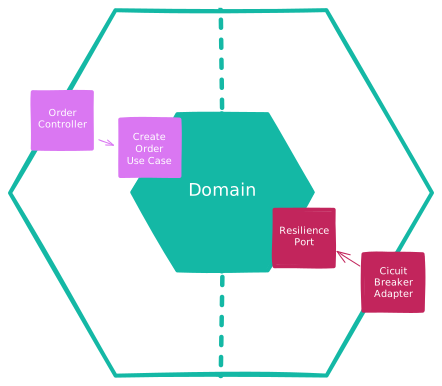
In our architecture, we put the Circuit Breaker inside the Infrastructure Layer (Output Adapters). Why here? Because the Circuit Breaker is an infrastructure concern, not a business concern. Your domain logic shouldn't know or care whether there's a circuit breaker protecting it.
Here's how the layers work together:
- Domain: Contains pure business logic. It just says "Create this order" — no knowledge of networks, retries, or circuit breakers. It calls a Port and trusts that the implementation will handle the rest.
- Port (Interface): Defines the contract between the domain and the outside world. For example,
OrderPorthas a methodcreateOrder(). The domain calls this interface, not the implementation. This is the boundary. - Adapter (Implementation): This is where the magic happens. The adapter implements the Port and wraps the external API call with a Circuit Breaker. If the circuit is open, it fails fast and returns a meaningful error. If it's closed, it makes the real HTTP call.
The flow looks like this:
Domain → Port (interface) → Adapter (Circuit Breaker + HTTP Client) → External API
This separation gives us several big advantages:
- Testability: You can unit test your domain logic without any network dependency. Just mock the port. Your domain tests run in milliseconds, not seconds.
- Flexibility: Want to switch from Resilience4j to another library? Just change the adapter. The domain doesn't care. You can even swap the entire HTTP client without touching your business logic.
- Clarity: When someone new joins the team and looks at the domain code, they see clean business logic. All the "messy" resilience code is isolated in the adapter where it belongs.
You can find the full working example with all the code in the GitHub repository below. It includes per-integration configuration, smart error detection, and the complete hexagonal architecture setup.
GitHub Repository: https://github.com/abidino/circuit-breaker-blog
Conclusion
In this article, we started from the basics — how distributed systems communicate and why they fail. We then explored the Circuit Breaker pattern: what it is, how it works, and what happens when you don't have one.
Circuit breakers are not just libraries or framework features. They are part of designing systems that expect failure instead of assuming success. Instead of hoping that every external call will succeed, you accept that failure is inevitable and design your system accordingly. It protects your CPU, Memory, and Threads — and more importantly, it prevents one bad service from taking down your entire platform.
We also looked at how to configure it for production with a solid baseline, and how to handle real-world scenarios like per-integration keys, smart error detection, and config overrides. Finally, we put it all together using Hexagonal Architecture to keep our business logic clean and our infrastructure concerns isolated where they belong.
Remember the key lessons:
- A slow service is worse than a dead service — it silently eats your resources.
- Fail fast, recover gracefully — don't wait for the full timeout for something that won't work.
- One circuit breaker per integration — don't let one provider's problems affect the others.
- Tune your configurations — there's no "one size fits all" in distributed systems.
If you want to see the full implementation with real code, check out the GitHub repository linked above.
In distributed systems, resilience is not optional. The real goal is not preventing failure — that is impossible — but preventing one failure from becoming a system-wide outage.
Resources: